
Your AI Drafted the Response. Who Did Everything Else?
The best Office Action solution reduces manual work across the entire matter’s workflow and preserves the points where attorney judgment creates value.
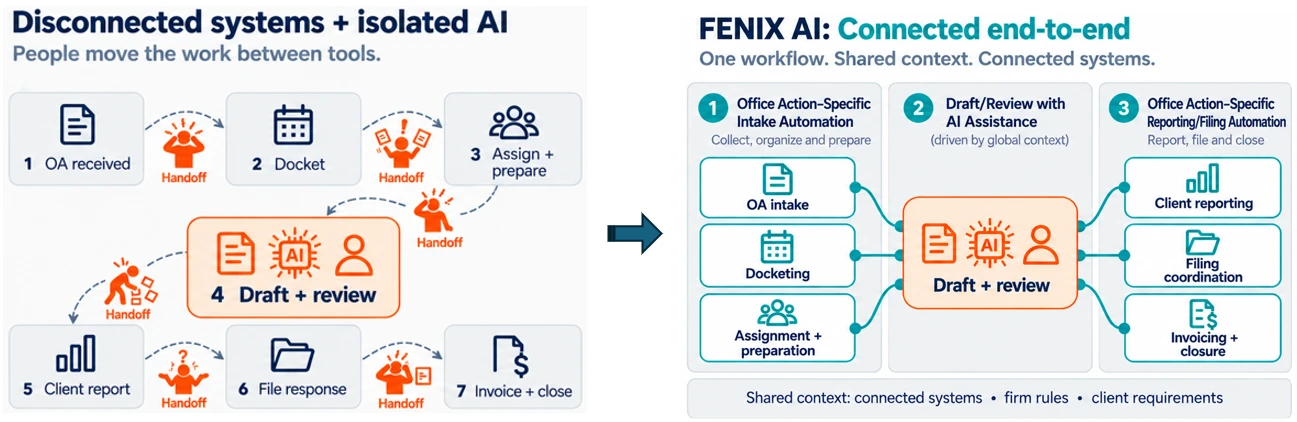
An AI tool can review an OA rejection and draft a promising response in minutes, yet the matter will still take several hours, changing hands multiple times. Hypothetically, an attorney might be impressed with an AI drafting tool and left with nothing to do but simply confirm the OA response strategy. But what happens before the documents are uploaded and after the response is approved? Someone had to intake the Office Action, assign the project, docket, and inform the team before the OA rejection landed on your desk. After the draft is approved, someone has to prepare the client correspondence, file the response and save the relevant documents to the right places, enter time, generate the invoice, and monitor the docket. Often, firms are executing these steps across multiple tools with various staff involved (each department and their respective tools working to accelerate some subset of the required tasks). If AI drafts the response but leaves every surrounding handoff intact, has the right part of the process been transformed?
The current generation of AI Office Action tools is largely AI wrappers competing over who organizes OA documents for an attorney and generates the best strategy for attorney review. Existing vendors often define the category around what they sell, and they conveniently grade on the same prevailing feature checklist: rejection analysis, prior-art search, draft generation, claim and antecedent-basis checking, jurisdiction support, security and confidentiality, etc. [1] [2]
Substantial team capacity is consumed by the less visible work of collecting information, transferring data, coordinating people, applying client rules, updating systems, and closing administrative loops. What if we assessed the effectiveness of an Office Action tool based on factors such as: attorney/staff touches per matter, intake-to-assignment time, time spent gathering information, draft-to-client-report cycle time, rework and data-entry errors, matters handled per team member, time from completed legal work to invoice, etc.?
The Fenix Approach: Connect your systems, map the workflow, and define the attorney judgment inputs before configuring the technology. Fenix does not begin with an AI model or a UI, we begin with the firm’s established workflows, client requirements, and best practices. Fenix identifies which events initiate work, what information each participant needs, which tasks are rule-based, where AI can assist, where attorney review or authorization is essential, and which downstream systems must be updated. Highly reliable automation combines firm skills/rules with client-specific templates and human-review checkpoints, where the human-review checkpoints highlight the firm’s professional contributions. The resulting architecture is integrated with systems the firm already relies on: docketing, email, USPTO data, document repositories, project management, billing, and the rest. Only then does your AI enter the picture, applied as an intelligence layer across the entire architecture rather than a sequence of UIs with siloed AI capabilities. Your AI technology should orchestrate the architecture of your practice, your practice should not adapt to the capabilities of your current AI product.
Intake, several handoffs, and invoicing → automated pipeline
- The USPTO issues an Office Action (typically signaled to the law firm by a correspondence notification tied to the firm’s customer number).
- Fenix automatically pulls the USPTO data (via USPTO email forwarding or ODP calls), and performs the following tasks:
- create the project and the required project tasks (based on action type, client, etc.);
- calculate or import the deadlines;
- assemble all project data (OA rejection, prior art, file history, examiner statistics, etc.);
- generate an OA response document based on firm best practices;
- AI structures the rejection responses, summarizes the cited art, flags potential response issues, and assists with strategy and drafting.
- generate reporting letters and other client-specific correspondence.
- Assign the team based on project data and/or docketing/workload context
- Update the docketing system with project and assignment details
- Notify the appropriate recipients (of the new project and any project assets)
- The firm defines where attorney input is required, including claim scope, amendments, factual characterizations, §112 support, interview strategy, and/or client advising.
- Once the OA response is approved/completed:
- populate client emails, internal reporting, and invoicing based on strategy/matter data.
- update docketing system with filing dates, filing receipts, etc.,
- store documents in iManage/NetDocs/etc.,
- finalize necessary team-notifications.
Repetitive administrative savings add up and compound. For example, eliminating just 12 minutes of administrative work across 1,250 annual prosecution events would recover 250 hours a year, or roughly $137,500 of capacity and potential billings (based on the $550 average hourly rate for IP work reported in the AIPLA 2025 Economic Survey[3]).
A more reliable approach for recapturing 12+ minutes per OA project is to stack administrative efficiencies across the complete workflow in addition to exploring state-of-the-art generative AI drafting efficiencies. Focusing on generative drafting tools alone is subject to constant evolution, requires workflow changes and/or new systems, etc. A comprehensive plan for optimizing OA workflows can deliver both generative drafting potential and the more tangible time savings resulting from eliminating human administration time.
We cut administrative work by reducing attorney and staff touches per matter, reducing intake-to-assignment time, reducing/eliminating time spent gathering information, reducing draft-to-client-report cycle time, and reducing time from completed legal work to invoice. Your bottom line moves when a handoff disappears. A five-minute drafting improvement is useful. Eliminating five manual handoffs may be transformational.
Human judgment should be designed into the system. As our industry evolves, firms will increasingly be evaluated based on how attorneys are involved in the process (and whether that involvement is defined by your firm or by your vendor). Most vendors concede that the drafting is not the hard part — which is exactly why the workflow must be built around the attorney rather than the tool. IP Author cautions that “speed claims are easy to make and hard to verify” and that the better question is whether the output survives attorney review without heavy rework.[1] Patsnap makes the sharper point: “generation speed is not the bottleneck it looks like” — deciding what to claim and argue is the expensive work.[2] Patsnap also reports that every vendor in its seven-product comparison disclaims accuracy in its terms, which makes “human in the loop” decisions critical for efficiency.[2]
A well-designed workflow therefore identifies precisely where professional judgment is required: characterizing the cited art, selecting the amendment strategy, confirming specification support, balancing allowance against commercially meaningful scope, advising the client on interviews, continuations, appeals, or abandonment, and approving representations and final submissions. AI should accelerate the work leading up to those decisions and execute the approved downstream actions afterward. Fenix automates around the attorney’s judgment.
Conclusion: Building internal architecture for OA automation is the sustainable advantage. Drafting tools will keep improving, new entrants will keep arriving, market leaders will keep changing, and their core capabilities will increasingly converge. The lasting advantage will come from connecting information, encoding the firm’s best practices, and directing automation around deliberate human judgment. Especially for high-volume teams, the winning solution is an Office Action operating system tailored to how the firm creates value, not another response-generation interface. Fenix builds around the way your team already works and supports branding your (increasingly critical) attorney value add.
Sources
- [1] IP Author, “Best AI Patent Drafting Software” (2026) — https://ipauthor.com/best-ai-patent-drafting-software/
- [2] Patsnap, “AI Patent Drafting Tools Compared (2026)” — https://www.patsnap.com/resources/blog/articles/ai-patent-drafting-tools-compared-2026/
- [3] AIPLA, 2025 Report of the Economic Survey ($550/hr average billing rate for IP work), as cited by the USPTO in Federal Register notice 2026-14389, 17 July 2026 — https://www.govinfo.gov/content/pkg/FR-2026-07-17/html/2026-14389.htm